
Building on the day night cycle from my last update, this week I've been prototyping my first organism: a plant that grows using photosynthesis.
I plan to implement 2 broad classes of organisms in my game, pixel-based organisms, intended as plant and fungi analogues, and free organisms which can move, turn, collide, and otherwise interact with the environment without being bound to its pixel grid. I am starting with the pixel based organisms because I want them to die and leave behind their organic matter for free organisms to feast on. By starting with plants, I can prep the environment with a reward system (food) for free organisms to build behaviors around.
To Make a Plant from Scratch One Must First Invent The Sun
The simplest possible pixel-based "organism" I could implement would just be a pixel that turns neighbors into clones of itself. Sprinkle in some randomness or neighbor based rules and the shapes will turn into blobs or Conway's Game of Life. Go look at any 2D cellular automata and behold, blobs!
But I want plant-like blobs, so my pixels need sunlight to grow. I have the direction and intensity of sunlight in my simulation from the day night cycle, but in order to utilize them for photosynthesis I needed to take a detour and implement shadows.
With light stored as a 2D vector, say [-.7, .7], every pixel can say "the light is coming from my upper left" and grow that way. But how does a pixel know if somewhere along the light ray there is some dirt or another plant casting a shadow?
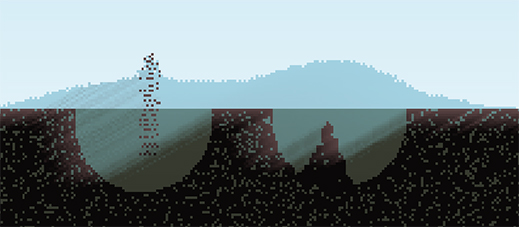
Since my sim is GPU based, I added a compute shader to calculate the light value for every pixel in the simulation with raycasting. Each pixel checks all pixels along the line from itself to the world border in the direction of the sun. If the ray encounters an opaque pixel, like dirt, that means it's in shadow.
However, in a 2D game it looks bad to have just 1 pixel block all the light, and I want water to transmit some light through it. I want the light to fade as the ray passes through more material, and each material should affect the light differently.
I defined a lookup table for materials with their opacity. So dirt, which has material ID=1, looks up OPACITY[1]. I sum up the opacity of all pixels along the line as my "shadow" value, capped at 1 for full shade. This approach is branchless since the opacity of air is 0, which is good for GPU performance. With some trial and error I found opacity values that looked nice.
To render lighting, in my materials rendering fragment shader, I multiply the pixel color by min(0.1, 1.0-shadow). While the light values range between 0 and 1, I don't want anything to be completely black on screen, so I'm visually clamping the light to a min of 0.1.
It's Alive!
Now that each pixel in the simulation knows how bright it is, I can make a new type of pixel in the game, Plant, that responds to it. My materials are stored as a big array of unsigned 32 bit integers. The material type is stored in the first 8 bits, and I can use the remaining 24 for whatever type specific data I want. Dirt uses 8 of those bits for its structural integrity to determine whether it should fall or not.
For plants, I'm using 8 bits to store an energy level. I increase the energy based on how much light the pixel is receiving and decrement it slowly over time. If a pixel reaches its max energy, 255, it decreases its energy and clones itself either upwards if that space is empty, or else towards the left or right, whichever is the brightest.
If the energy reaches 0, it dies and becomes a new material that doesn't grow which I'm calling Organic. Since I'm coloring pixels between a dead brown and a vibrant green based on energy, this creates an interesting tree ring like effect, where the light penetrates a few pixels deep during the day, energizing the plant pixels, but the deeper pixels fade.
Using 8bit data blocks is convenient because WGSL has a handy pack4xU8 function. There are also functions for packing 8 and 16bit floats which I suspect I will use when I inevitably encounter a need to store more than 24 bits of data for a material.
Next Steps
At this point, progress is very much subject to the learning process. Learning how to program in Rust better, discovering limitations of the WebGPU and wgpu's implementation of it, learning about performance characteristics of GPU based workloads, and experimenting with my engine's architecture. But learning is the reason for doing any of this!
My vision for this game entails several technical hurdles that I've been chewing on, each will likely take time and iteration to get right. The main goals and problems I'm considering right now are these:
- Making the world a closed system. An organism cannot grow without collecting its mass and chemical makeup from the environment. Their life, actions, and death cannot create or destroy, just reorganize. One exception to this is energy, Earth is not a closed energy system as we collect energy from the sun and radiate it away into space. But we are a (sort of) closed matter system (if you ignore meteors and E=MC2).
- Minerals and resources. Plants need water and minerals to grow, they don't just convert "dirt" to "plant". In a closed system, an organism needs to pull minerals and water from pixels around it. Those resources enable the organism to perform actions, but to remain a closed system, I can't simply subtract a resource with the organism retaining it, perhaps modifying it through a reversible process such as with the nitrogen cycle, and re-adding it.
- Different behavior states for different pixels of an organism. How do I create a plant that consists of roots, stems, and leaves while maintaining the concept of a single connected organism? Do I need to have a concept of a "single connected organism" or should it be more free-form? What about growing from a seed? What about plants which can sprout roots from branches and vines lying on the ground, such as willow or ivy? A root cannot photosynthesize and should grow towards water and nutrients, not towards light. Organisms in real life contain a copy of all possible actions in their genome and each cell only expresses a subset of the genome at a time.
- Resource sharing. For a plant to have roots and leaves, it's necessary the roots share the resources they absorb with the leaves and for the leaves to share the energy they absorb with the roots. How will different organisms share resources with each other, be it cooperatively or aggressively? Interesting organisms will be ones that evolve effective strategies for sharing and conserving resources.
These are all challenges that I'm excited to tackle in my pursuit of beautiful emergent properties in this game.
Playable Demo
Only supports desktop Chrome and Firefox browsers.
- Use the Brush window to select a material, brush size, and shape.
- Right click to draw with the brush.
- Scroll to zoom
- Left click and WASD to pan