The funny thing about deciding to start developing a video game without a game engine is that eventually you find yourself building an engine.
The Training Montage
As the 2025 holiday season was ramping up, I had just implemented a day night cycle, lighting, and a sort of plant in Soil. Looking down the barrel of my todo list: Rain, percolation, temperature, organisms that consume water, organisms that eat those organisms... I found that the amount of boilerplate I was writing, implementing each feature with raw wgpu API calls, was quickly resmembling spaghetti. And the meatballs were few and far between.
I already had two failed undertakings to factor out my compute shader
definitions into a nice encapsulated API surface. My hopes and abstractions
struck down by the iron fist of Rust's borrow checker. There I was,
heedlessly burrowing through nested structs, flinging mutable references
left and right, when suddenly I come to a halt at the dreaded squiggly red
line: "cannot borrow `physics` as mutable because it is also borrowed as
immutable".
But time went on, and all of my stimyed efforts were rewarded with a slow accumulation of intuition about Rust's rules. All those blog posts and Hacker News comments claiming that "once I understood Rust it made me write better software" started to feel a little more within my grasp.
The First Step from Demo To Engine
When I went to tackle Soil's water cycle, in the inlaw's spare bedroom, between Christmas festivities, I decided to take a new approach. I began by writing the feature by calling API functions that didn't exist yet, and using my newly acquired judgement to guess whether the imaginary functions were possible to implement.
Since all of my game's features are implemented in compute shaders, I just wrote code that described all the aspects of the compute shaders I needed for the water cycle, then went and implemented the functions needed to do so. Working top down instead of bottom up meant that I wasn't getting trapped by designing unnecessary abstractions.
There was still of plenty iteration. I was going back and forth between rewriting the consumption of the API and the implementation until I had something that cut out the duplicative boiler plate and let me think about compute shader passes and data bindings as primitive building blocks without being lost in a see of initialization and descriptor structs.
In the process, I accidentally re-invented the Builder pattern, and learned how to use Rust lifetimes to improve the ergonomics of code rather than just shoving them in whenever the compiler complained at me.
So over a few weeks, I got the water cycle was working, then converted the rest of my sytems over, refining as I went. And that's when I realized I was writing a game engine. Building the building blocks for implementing game mechanics faster, and with less overhead.
So then I asked Claude to implement a RenderPass API using the same or similar traits, and structs as my ComputePass API, and it spat out exactly what I wanted in about a minute. We truly are living in the future.
A sample of what using my Rust API looks like:
uniform_struct!(WorldSize {
    width: u32,
    height: u32,
    _pad1: u32,
    _pad2: u32,
});
let atoms = StorageBuffer::new(
device,
&BufferDescriptor {
label: Some("sand_buffer"),
size: atoms_byte_count as u64,
usage: BufferUsages::STORAGE
| BufferUsages::COPY_DST
| BufferUsages::COPY_SRC,
mapped_at_creation: false,
},
);let bg0: &[&dyn IntoBinding] = &[world.world_size_uniform()];
let bg1: &[&dyn IntoBinding] = &[world.atoms_buffer()];
let sim_solid = ComputePassBuilder::new("falling_sand")
.with_entry_point("sim_solid")
.with_bindgroup_0(bg0)
.with_bindgroup_1(bg1)
.build(ctx);
let sim_gas = ComputePassBuilder::new("falling_sand")
.with_entry_point("sim_gas")
.with_bindgroup_0(bg0)
.with_bindgroup_1(bg1)
.build(ctx);
let skybox_pass = RenderPassBuilder::new("skybox")
    .with_bindgroup_0(&[&camera.uniforms])
    .with_bindgroup_1(&[&sky.uniforms])
    .build(&mut ctx, surface_config.format);
let materials_pass = RenderPassBuilder::new("materials")
    .with_blend_state(BlendState::ALPHA_BLENDING)
    .with_load_op(LoadOp::Load)
    .with_bindgroup_0(&[&camera.uniforms])
    .with_bindgroup_1(&[
        world.world_size_uniform(),
        &world.atoms_buffer().readonly(),
        &physics.lighting.light_texture.storage_ro(),
        &physics.lighting.transmission_sampler,
    ])
    .build(&mut ctx, surface_config.format);
The Optimization Rabbit Hole
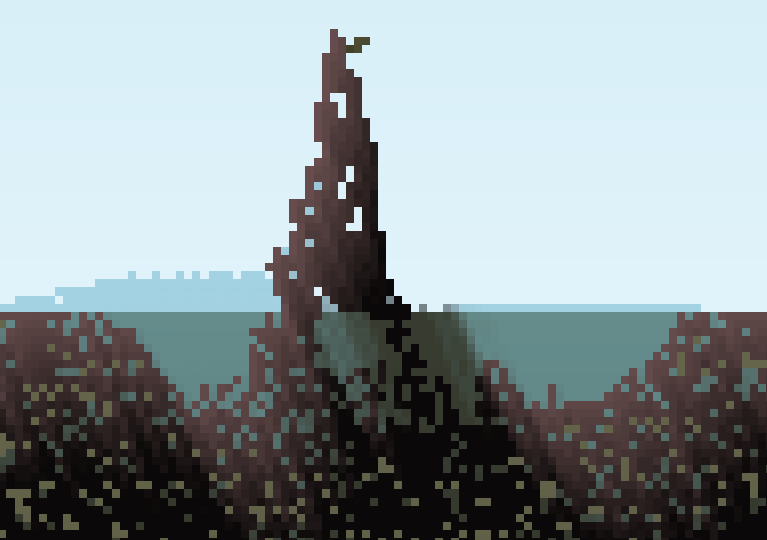
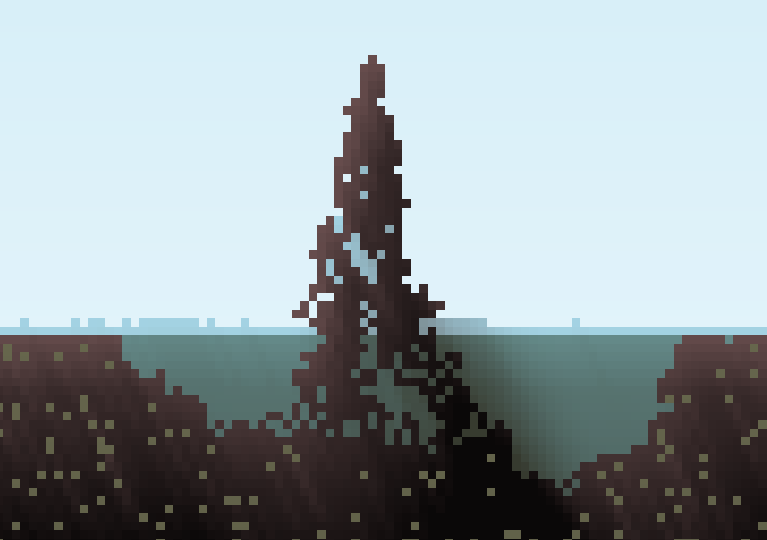
Most of that work took place on my laptop while in transit for holiday travels. Using slower hardware made it clear that my lighting needed an optimization. My laptop would start chugging at only 2x simulation speed while my desktop handled 8x without a sweat.
Illumination for each pixel is calculated through a 2D ray trace up to the world boundary, accumulating the opacity value of each pixel along the way. That's a lot of samples to take for pixels along the edges. To speed it up, I would sample each pixel up to some distance, then start sampling a lower resolution buffer containing the average opacities in each grid square, similar to a mipmap. This would cause softer shadows, but I'm choose to interpret that as a feature! This will surely not be the final implementation, but I must move on.
Before
After
But before I implemented the optimization, I wanted to know just how slow
lighting was so I could know much the optimization would help. The WebGPU
spec has a TIMESTAMP_QUERY feature, though it's not supported
on all devices, for querying the start and end timestamp of a shader
execution.
Filled with visions of a beautiful profiler GUI, each frame represented as a subdivision of a timeline filled with colorful bars for each GPU pass execution, I started integrating timestamp queries, automatically added to each compute and render pass, into my engine.
Several weeks later, I ran out of steam with what amounted to a worse implementation of Wumpf's wgpu-profiler. My GUI now shows the average over 64 frames of the execution time each shader.
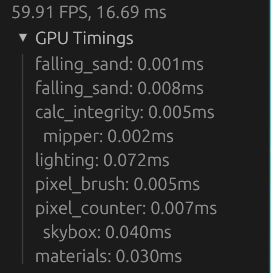
But my lighting went from ~0.24ms to ~0.09ms on my laptop, so I called it a success and moved on!
Preparing for Next Time
The last piece of engine work I did was in preperation for implementing a more interesting world generation system than the CPU-side for loop over the first half of the atoms buffer, randomly picking between dirt, water, and air pixels before starting the simulation.
This entailed transitioning the world generation to a shader using the aforementioned infrastructure, as well as introducing the concept of scenes to the engine. The goal was to enable transitioning from one GUI and set of shaders for the world generation inferface to another GUI and shader set for the main game scene.
The scene system is what I'll be using to implement menus and other game interfaces like shops and organism editors.
I'm writing this as I wrap up the loose ends of world generation and the new materials I added for it. So hold on for the next post where I'll show it off and include a playable demo.